本地搭建合规换脸实验服务:Python API 接口完整教程
wxk1991 Lv5

本地搭建合规换脸实验服务:Python API 接口完整教程

先说明一点:

1
换脸、人脸替换、人脸生成这类技术,只应该用于本人或明确授权的素材。

我不会写“支持 NSFW 换脸”的教程。

原因很简单:这类能力很容易被用于非自愿色情深度伪造,风险太高,也不应该被当成普通技术教程传播。

本文写的是一个合规版本:

1
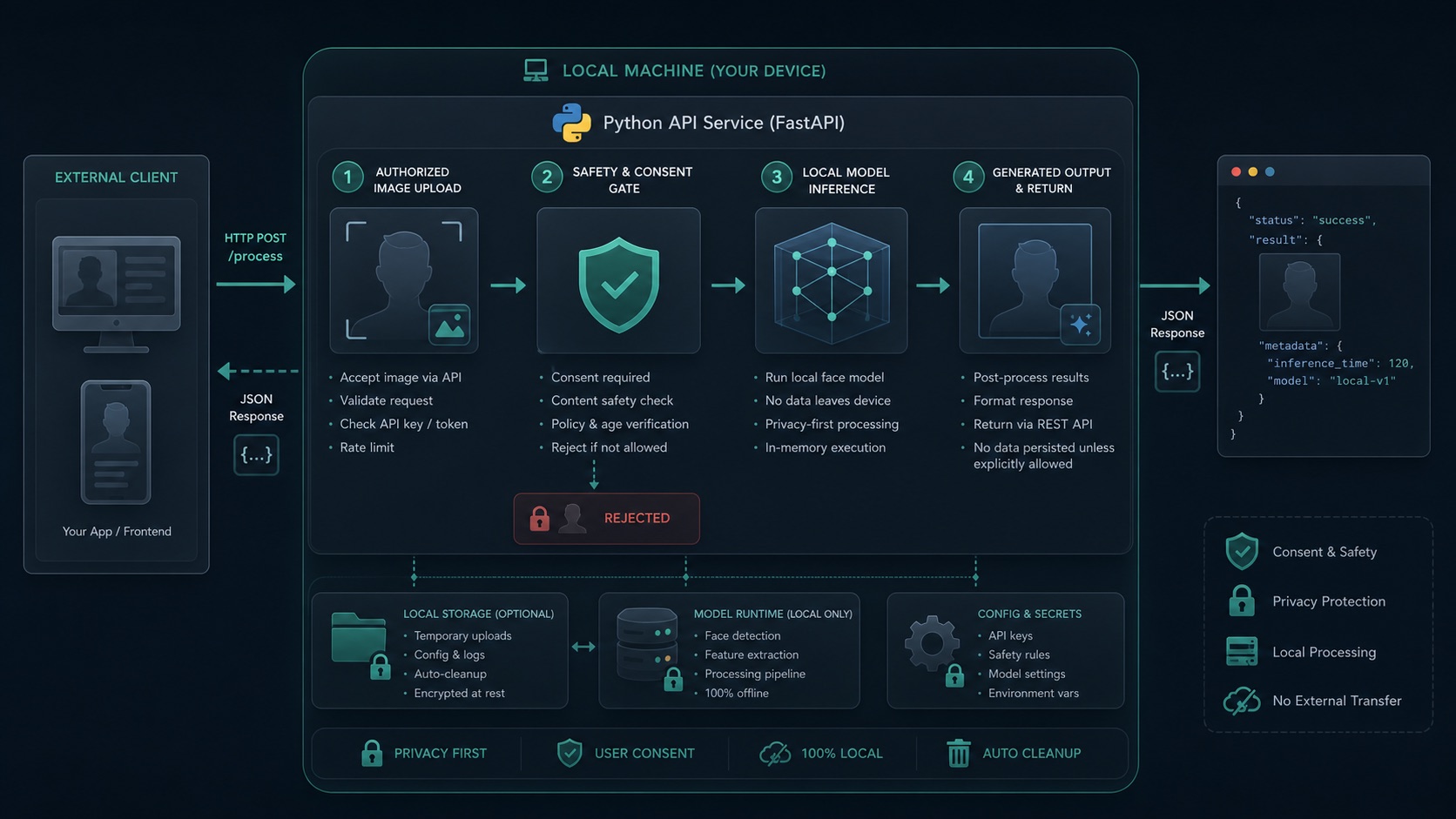
本地搭建一个人脸替换/图像处理实验服务,并通过 Python API 给外部程序调用。

它包含:

  • 本地 Python 环境
  • 模型服务结构
  • 文件上传接口
  • 任务队列
  • 内容安全检查
  • API Token 鉴权
  • 外部程序调用示例

本地合规人脸处理 API 架构


一、项目目标

我们要做的不是一个“网页玩具”,而是一个可以被其他程序调用的本地 API 服务。

最终效果类似:

1
外部程序 -> HTTP API -> 本地 Python 服务 -> 安全检查 -> 模型处理 -> 返回结果图片

接口大概长这样:

1
POST /api/v1/face/process

上传:

  • source_image:源人脸图
  • target_image:目标图

返回:

  • task_id
  • status
  • result_url

二、准备 Python 环境

建议使用 Python 3.10 或 3.11。

创建项目:

1
2
3
4
mkdir local-face-api
cd local-face-api
python3 -m venv .venv
source .venv/bin/activate

安装依赖:

1
pip install fastapi uvicorn python-multipart pillow opencv-python pydantic

如果你后面要接入自己的本地模型,可以再安装对应推理框架,例如:

1
pip install onnxruntime

或者:

1
pip install torch torchvision

具体用哪个取决于你的模型格式。


三、项目目录结构

推荐这样组织:

1
2
3
4
5
6
7
8
9
10
11
12
13
14
15
local-face-api/
├── app/
│ ├── main.py
│ ├── config.py
│ ├── security.py
│ ├── safety.py
│ ├── storage.py
│ └── processor.py
├── data/
│ ├── uploads/
│ └── outputs/
├── models/
│ └── README.md
├── requirements.txt
└── .env

这里重点是把几个职责拆开:

文件 作用
main.py FastAPI 入口
security.py API Token 鉴权
safety.py 内容安全检查
storage.py 文件保存
processor.py 模型处理逻辑

不要把所有东西都堆到 main.py

后面维护会很痛苦。


四、配置 API Token

创建 .env

1
2
API_TOKEN=change-me-to-a-long-random-token
OUTPUT_BASE_URL=http://127.0.0.1:8000

app/config.py

1
2
3
4
5
6
7
import os

API_TOKEN = os.getenv("API_TOKEN", "change-me")
OUTPUT_BASE_URL = os.getenv("OUTPUT_BASE_URL", "http://127.0.0.1:8000")

UPLOAD_DIR = "data/uploads"
OUTPUT_DIR = "data/outputs"

实际部署时不要用默认 Token。


五、接口鉴权

app/security.py

1
2
3
4
5
6
7
8
9
10
11
12
13
14
15
from fastapi import Header, HTTPException
from app.config import API_TOKEN


def verify_token(authorization: str | None = Header(default=None)):
if not authorization:
raise HTTPException(status_code=401, detail="Missing Authorization header")

prefix = "Bearer "
if not authorization.startswith(prefix):
raise HTTPException(status_code=401, detail="Invalid Authorization format")

token = authorization[len(prefix):]
if token != API_TOKEN:
raise HTTPException(status_code=403, detail="Invalid API token")

外部程序调用时必须带:

1
Authorization: Bearer your-token

六、内容安全检查

这里我们做一个最小版本:

1
2
3
拒绝过大的图片
拒绝非图片文件
拒绝 NSFW / 未授权素材

app/safety.py

1
2
3
4
5
6
7
8
9
10
11
12
13
14
15
16
17
18
19
20
21
22
23
24
25
26
27
28
29
30
31
32
from fastapi import HTTPException, UploadFile

MAX_FILE_SIZE = 8 * 1024 * 1024
ALLOWED_TYPES = {"image/jpeg", "image/png", "image/webp"}


async def validate_upload(file: UploadFile):
if file.content_type not in ALLOWED_TYPES:
raise HTTPException(status_code=400, detail="Only jpg/png/webp images are allowed")

content = await file.read()
if len(content) > MAX_FILE_SIZE:
raise HTTPException(status_code=400, detail="Image is too large")

await file.seek(0)


def reject_nsfw_or_unconsented():
"""
这里预留安全检查。

实际项目中,你可以接入:
1. 自己的内容审核模型
2. 第三方审核服务
3. 人工审核流程

规则建议:
- 明确拒绝 NSFW
- 明确拒绝名人、公众人物、未授权人物素材
- 记录审计日志
"""
return True

如果你要上线给别人用,安全检查必须更严格。

至少应该增加:

  • NSFW 分类器
  • 人脸授权确认
  • 请求日志
  • 水印
  • 频率限制
  • 人工审核

七、文件保存

app/storage.py

1
2
3
4
5
6
7
8
9
10
11
12
13
14
15
16
17
18
19
20
21
22
23
24
25
26
27
28
import os
import uuid
from fastapi import UploadFile
from app.config import UPLOAD_DIR, OUTPUT_DIR, OUTPUT_BASE_URL


os.makedirs(UPLOAD_DIR, exist_ok=True)
os.makedirs(OUTPUT_DIR, exist_ok=True)


def new_task_id() -> str:
return uuid.uuid4().hex


async def save_upload(file: UploadFile, task_id: str, name: str) -> str:
ext = os.path.splitext(file.filename or "")[1].lower() or ".png"
path = os.path.join(UPLOAD_DIR, f"{task_id}_{name}{ext}")
with open(path, "wb") as f:
f.write(await file.read())
return path


def output_path(task_id: str) -> str:
return os.path.join(OUTPUT_DIR, f"{task_id}.png")


def output_url(task_id: str) -> str:
return f"{OUTPUT_BASE_URL}/outputs/{task_id}.png"

八、模型处理逻辑

app/processor.py

1
2
3
4
5
6
7
8
9
10
11
12
13
14
15
16
17
18
19
20
21
from PIL import Image, ImageDraw


def process_face_image(source_path: str, target_path: str, output_path: str):
"""
合规示例:
这里不提供任何 NSFW 能力,也不绑定某个具体换脸模型。

你可以把这里替换成:
- 自己训练/授权使用的模型
- 只处理本人素材的内部模型
- 企业内部合规图像处理流程
"""
target = Image.open(target_path).convert("RGB")

# 示例:只做一个占位水印,证明接口流程跑通。
draw = ImageDraw.Draw(target)
draw.rectangle((20, 20, 320, 72), fill=(15, 118, 110))
draw.text((32, 36), "Processed by local API", fill=(255, 255, 255))

target.save(output_path)

这里故意只写占位逻辑。

因为真正的人脸替换模型必须确认素材授权、模型许可和使用边界。


九、FastAPI 主入口

app/main.py

1
2
3
4
5
6
7
8
9
10
11
12
13
14
15
16
17
18
19
20
21
22
23
24
25
26
27
28
29
30
31
32
33
34
35
36
37
38
39
from fastapi import Depends, FastAPI, File, UploadFile
from fastapi.staticfiles import StaticFiles

from app.security import verify_token
from app.safety import validate_upload, reject_nsfw_or_unconsented
from app.storage import new_task_id, save_upload, output_path, output_url
from app.processor import process_face_image

app = FastAPI(title="Local Consent Face Processing API")
app.mount("/outputs", StaticFiles(directory="data/outputs"), name="outputs")


@app.get("/health")
def health():
return {"status": "ok"}


@app.post("/api/v1/face/process")
async def process_face(
source_image: UploadFile = File(...),
target_image: UploadFile = File(...),
_=Depends(verify_token),
):
await validate_upload(source_image)
await validate_upload(target_image)
reject_nsfw_or_unconsented()

task_id = new_task_id()
source_path = await save_upload(source_image, task_id, "source")
target_path = await save_upload(target_image, task_id, "target")
result_path = output_path(task_id)

process_face_image(source_path, target_path, result_path)

return {
"task_id": task_id,
"status": "completed",
"result_url": output_url(task_id),
}

启动服务:

1
API_TOKEN=dev-token uvicorn app.main:app --host 0.0.0.0 --port 8000

访问:

1
http://127.0.0.1:8000/docs

可以看到 Swagger 文档。


十、外部程序调用示例

使用 curl

1
2
3
4
curl -X POST "http://127.0.0.1:8000/api/v1/face/process" \
-H "Authorization: Bearer dev-token" \
-F "[email protected]" \
-F "[email protected]"

使用 Python:

1
2
3
4
5
6
7
8
9
10
11
import requests

url = "http://127.0.0.1:8000/api/v1/face/process"
headers = {"Authorization": "Bearer dev-token"}
files = {
"source_image": open("source.png", "rb"),
"target_image": open("target.png", "rb"),
}

res = requests.post(url, headers=headers, files=files, timeout=60)
print(res.json())

十一、生产环境建议

如果这个服务要长期运行,建议增加:

  • 请求队列
  • 任务状态表
  • 日志审计
  • 访问频率限制
  • IP 白名单
  • 内容审核模型
  • 用户授权确认
  • 输出图片水印
  • 自动清理临时文件

如果模型推理耗时较长,不建议同步阻塞请求。

可以改成:

1
提交任务 -> 返回 task_id -> 后台处理 -> 查询结果

接口:

1
2
POST /api/v1/face/tasks
GET /api/v1/face/tasks/{task_id}

总结

本地搭建人脸处理 API 并不难。

真正难的是:

1
如何保证它只用于授权、合规、可审计的场景。

所以本文给的是一个安全边界清楚的版本:

  • 本地运行
  • API 调用
  • Token 鉴权
  • 文件上传
  • 安全检查
  • 模型处理占位
  • 输出结果

如果你要接入真实模型,请先确认:

1
2
3
4
5
素材有授权
模型许可允许
输出用途合规
不处理 NSFW
不处理未授权人物

技术能做,不代表应该做。